Your Property. Your Footage. Your Rules.
PerimeterEye's privacy posture is simple: your footage is recorded and stored on the Brain — a true edge computer you own — and core defense (live view, recording, rewind, siren, spotlights) keeps working during internet outages. PerimeterEye is not an alarm-monitoring service — alerts and control go directly to you — and Off means off: the system physically stops accepting camera streams, so nothing is watched, recorded, or stored.
 View photo
What PerimeterEye adds
Same camera. A different outcome.
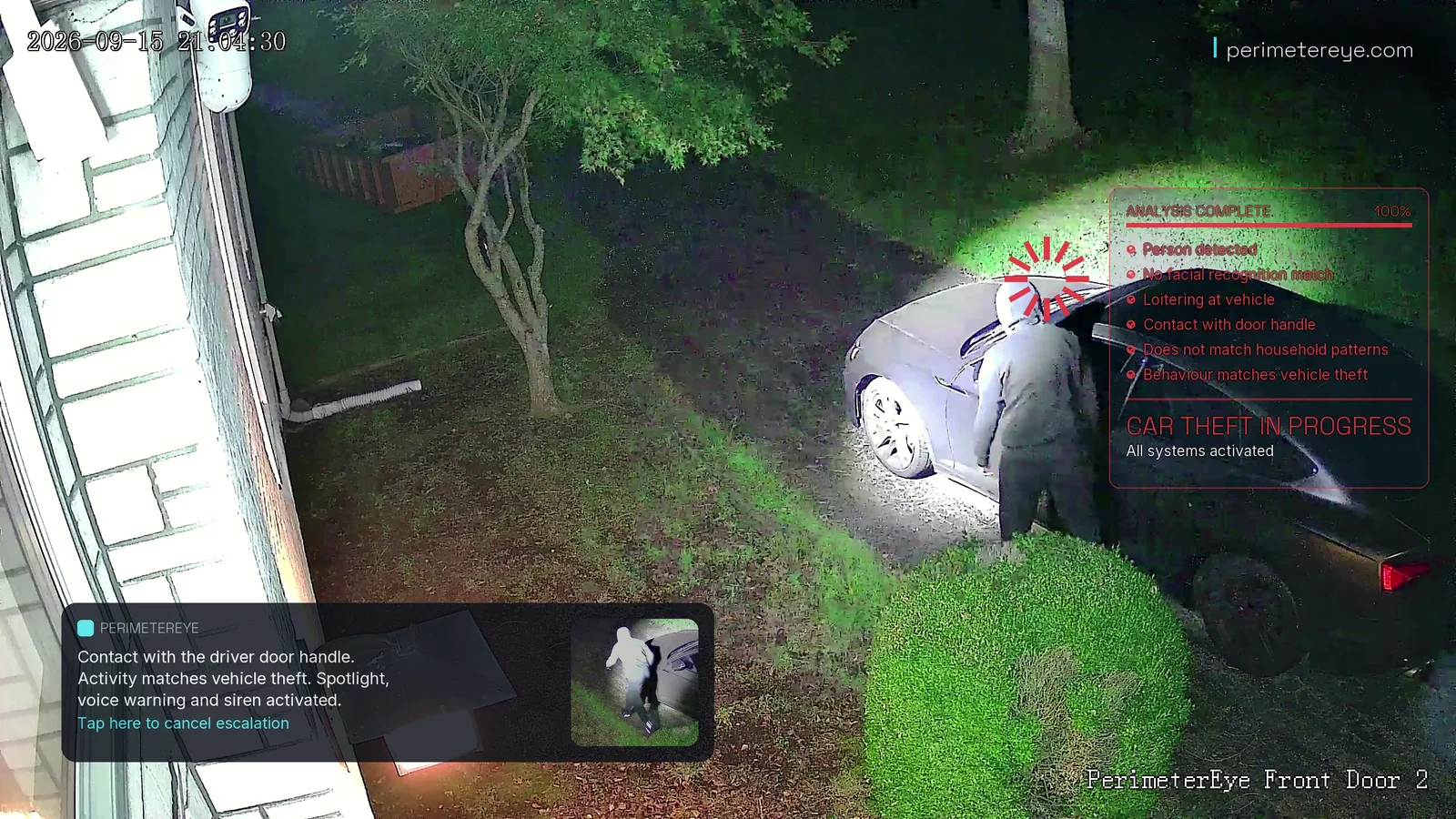
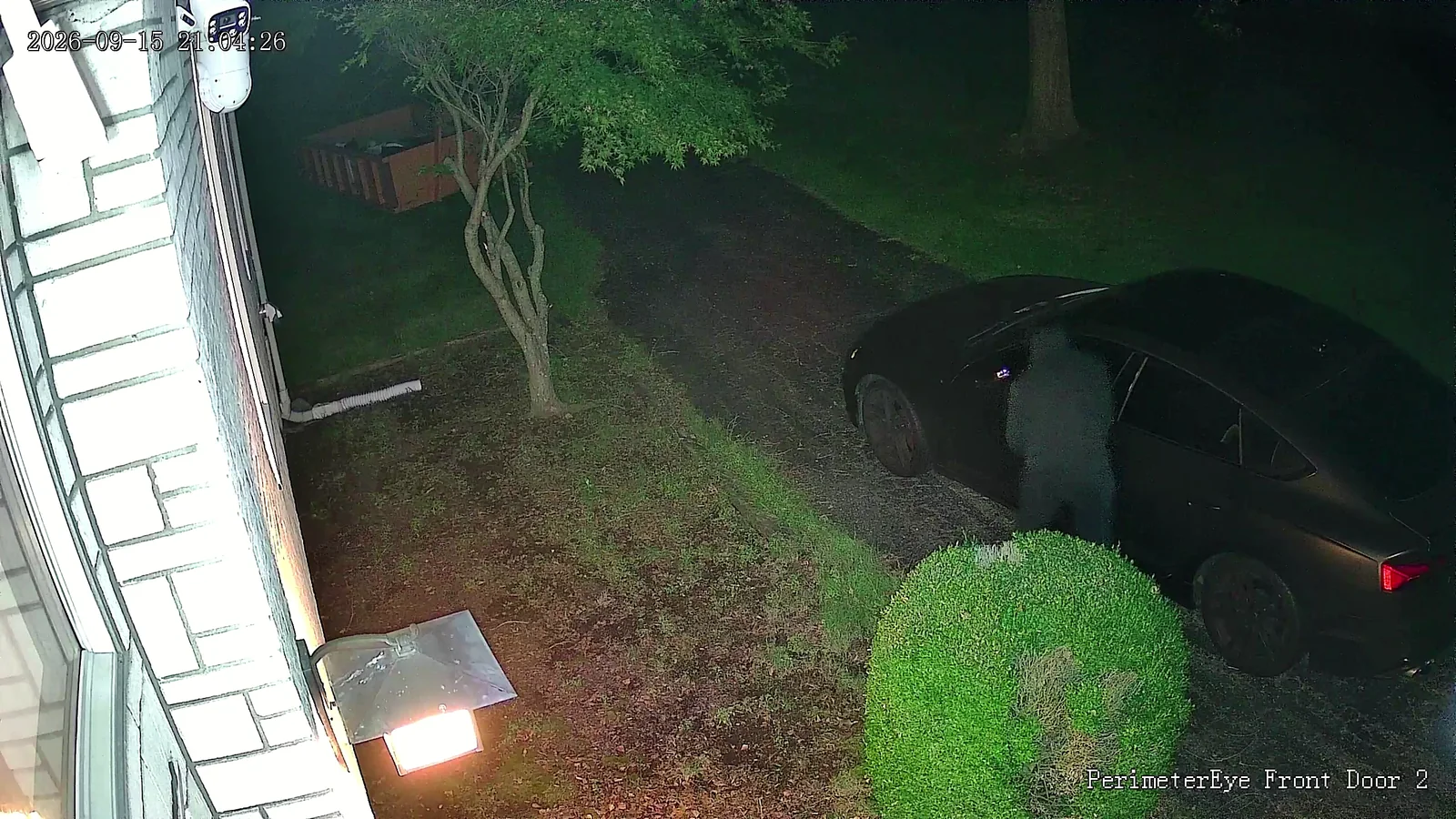
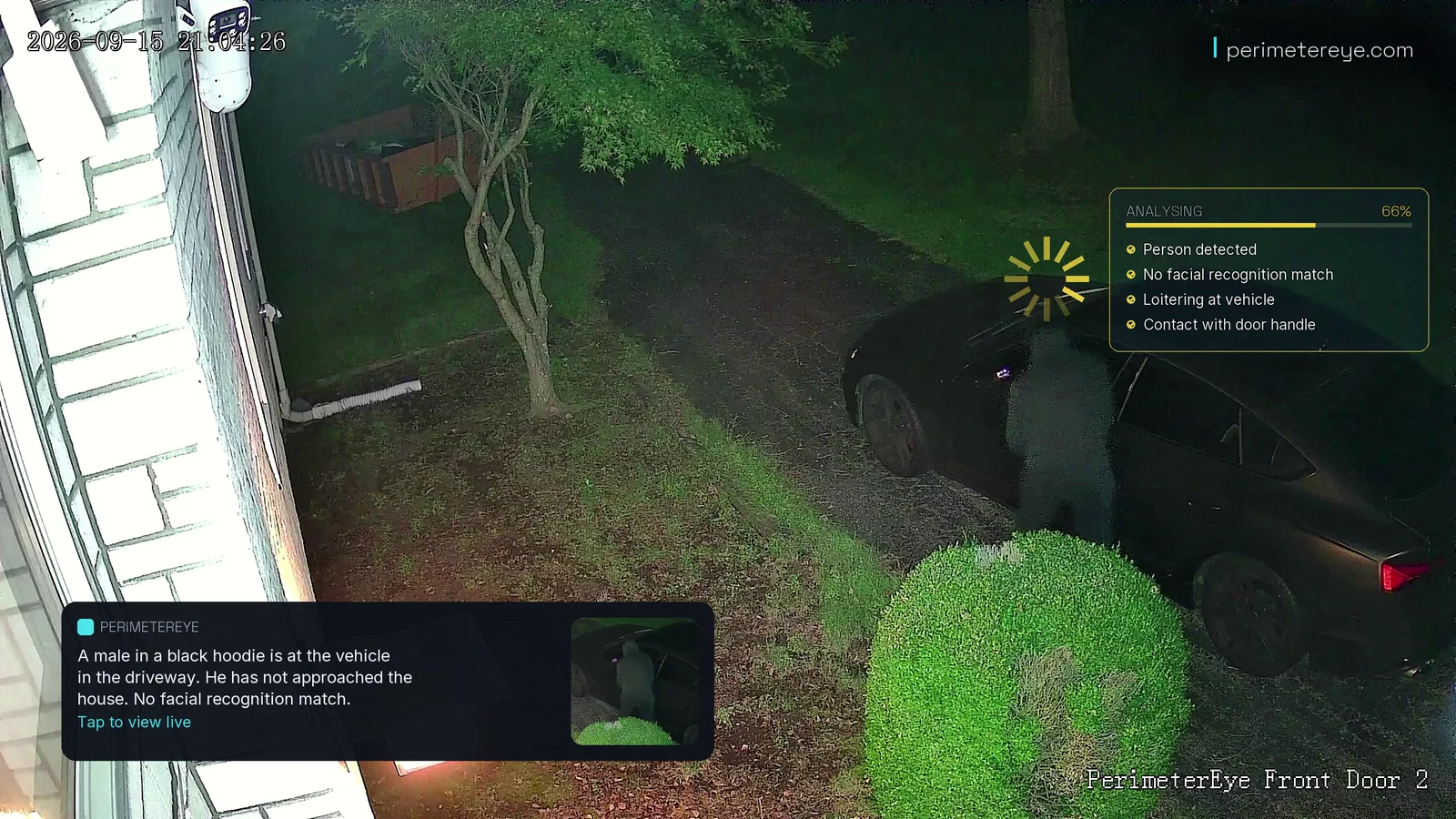
One camera and one staged break-in, shown three ways: the view on its own, with PerimeterEye’s analysis, and with its response hardware.
1 of 3 · A camera aloneView full size
It records
A person at the driver’s door, on a camera that records. Unless someone opens the clip in time, nothing else happens.
2 of 3 · UnderstoodView full size
The same view, understood
PerimeterEye reads the same moment: a person, no match to anyone it knows, loitering at the vehicle, contact with the door handle. The alert describes them in plain language.
3 of 3 · AnsweredView full size
The same view, answered
With a tracking searchlight, a siren, and AI voice warnings, the camera’s view directs a response. Four seconds later, the searchlight is on the person at the driver’s door.
Stills from a vehicle break-in staged for filming on a real property, on the Front Door 2 camera’s clock (21:04:26 and 21:04:30). The system’s response was automatic, with no operator.
What changes
Privacy as a Design Decision, Not a Settings Page
- Footage lives on your property, on hardware you own — not in someone else's account.
- Not an alarm-monitoring service — no monitoring center, and alerts and control go directly to you.
- Off is real: the system physically stops accepting camera streams — nothing watched, recorded, or stored.
Most camera platforms treat privacy as a toggle bolted onto an account-centric product: your footage lives in their infrastructure, under their terms, and "privacy" means asking them nicely to look away. PerimeterEye inverts the starting point. The system lives at your property, the footage stays at your property, and there is no monitoring service in the loop — alerts and control go directly to you.
That inversion is also why the defense works the way it does. A system that responds on-site doesn't wait on anyone's queue, doesn't stop defending when the internet drops, and doesn't require you to trade away your household's ordinary days to protect against its rare bad ones.
What every system includes
- On-site edge computer (the Brain)
- 4K AI cameras
- Tracking searchlights
- Live targeted AI voice
- 130 dB siren escalation
- Doorbell video intercom
- Wall panel command center
- iOS app with live 4K video
01
Your Footage Stays on Your Property
Every PerimeterEye system runs on the Brain, a true edge computer installed at your property — dedicated CPU, GPU, RAM, and SSD running PerimeterEye OS. That is where your footage lives: on hardware you own, at the property it defends.
This isn't a philosophical flourish; it has practical teeth. Core defense — live view, recording, rewind, the siren, and the spotlights — keeps working during internet outages, because none of it depends on a distant service being reachable. Your property doesn't stop defending itself when your ISP has a bad night.
02
Not a Monitoring Service
PerimeterEye is not an alarm-monitoring service — it is an Automatic Property Defense System, and alerts and control go directly to you. There is no monitoring center and no shift of agents reviewing your cameras as part of the product — no "managed review" tier. When something happens, the analysis, the live video, and the controls arrive on your phone and your wall panel — not on a screen in a facility you'll never see.
Some competitors make human review the product: as of mid-2026, Deep Sentinel staffs live guards in a surveillance center from roughly $100/mo, and SimpliSafe and Ring sell human-agent tiers at comparable prices. Those are legitimate designs for people who want them. They also mean, by definition, that employees can see into your property. PerimeterEye takes the other path: it is not a monitoring service, and there is no agent-review tier in the product.
03
Off Means Off
Plenty of systems have a "privacy mode" that's really a notification filter — the cameras keep rolling and the app just stays quiet. PerimeterEye's Off mode is physical: the system stops accepting camera streams entirely. Nothing is watched, nothing is recorded, nothing is stored. Choosing Off doesn't mute the system; it takes its eyes away.
Between Off and Maximum Security sit four more modes — Quiet, Visitor, Armed, and High Alert — so scrutiny can match the moment: a backyard party, an ordinary Tuesday, a week out of town. There is nothing to arm or disarm; you set the mode and the system holds it.
04
The Household Stays Known — and Left Alone
The system knows the household, and it uses that knowledge to leave your family alone: arrivals never trigger deterrence, the regular mail carrier passes without escalation, and the response ladder is reserved for verified unknowns. Scrutiny lands where it belongs — on the stranger at the fence line, not your teenager coming home late.
Every event still gets a written analysis, because documentation and deterrence are different things. The daily briefing tells you what happened on your property; the hardware escalates only against people the system has verified as not belonging there.
05
You Hold the Controls
Every escalation the system can take — searchlight, voice, siren — is something you can watch, join, or override live from the iOS app or the wall panel. Speak through any camera yourself, take manual control of a spotlight, or step the system down mid-event. Automation handles the seconds; you keep the authority.
Ownership completes the picture. The hardware is yours, the footage lives on your property, and clip export from the app puts your evidence wherever you decide it should go — police, a locked folder, or nowhere at all. On your terms, every time.
Watch it at full speed
The same response, on film.
Real footage of the working system. Play it with sound to hear the voice warning and the siren.
A staged vehicle break-in on a real property. Voice warning, tracking searchlight and a 130 dB siren — automatic, on-site, no operator. The scenario was staged for filming; the system's responses were not.
Play with sound to hear the voice warning and siren.What it costs
See what a system costs for your property.
Essential system
As low as$146/mo*Essential covers a driveway and the approaches to the house. Larger properties usually suit Advanced or Estate; a specialist can size it with you before you order.
What’s included
- 5 ultra-HD 4K cameras
- 1 tracking spotlight
- 1 speaker/siren unit
- PerimeterEye Access intercom, included with every complete system
- 1 PerimeterEye control panel
- 1 PerimeterEye AI processor
*Essential system, $0 down: 36 monthly payments of $145.17 at 10% APR on the hardware price before sales tax, shown rounded up to the dollar. Affirm rates 0–36% APR; Klarna terms are shown at checkout. Subject to eligibility and lender approval; your rate, term and down payment may differ. US only; not available in all states. Software is billed separately: first 6 months included, then $99/month.
Before you choose
Common questions
Where is my footage stored?
On your property, on the PerimeterEye Brain — a true edge computer you own, with its own dedicated storage. Your footage is recorded and kept there. You can view live 4K, rewind instantly, and export clips from the iOS app whenever you need evidence in hand.
Can PerimeterEye employees or agents watch my cameras?
PerimeterEye is not an alarm-monitoring service — alerts and control go directly to you. There is no monitoring center and no shift of agents reviewing your cameras as part of the product. Your live video reaches your phone and your wall panel.
What actually happens in Off mode?
The system physically stops accepting camera streams. Nothing is watched, nothing is recorded, nothing is stored — not filtered, not paused: off. It's the mode for moments you want no eyes on the property at all, and it stays that way until you choose another mode yourself.
Does the system keep working if my internet goes out?
Core defense does — live view, recording, rewind, the siren, and the spotlights all keep working during internet outages, because everything runs on the on-site Brain. Features that inherently need a connection, like alerts reaching your phone while you're away, resume as soon as the connection does.
Is a private, self-contained system as effective as a monitored one?
Privacy and effectiveness aren't in tension here — the response ladder runs automatically in seconds, with no human review step to wait on. The honest caveat applies to every design: no security system can guarantee prevention of every incident. What this design does change is narrower and real — PerimeterEye is not a monitoring service, and alerts and control go directly to you.
Keep exploring
Related reading
Put a response behind your property.
Tell a specialist about your property, your driveway, and where people approach. They’ll size the cameras, searchlights, and sirens with you, or book a call first if you’d rather talk it through.
Explore an upgrade for your existing camerasSystem launch offer
Your first 6 months
of service included.
First 6 months included from activation. Then $99/month.
Compare system packages